5 Hacks To Stop Doomscrolling In 2026
Doomscrolling rarely starts as a conscious decision. Most of the time, it begins in tiny, almost invisible moments. You open your phone while waiting for water to boil. You check one notification. You scroll “just for a minute”…
Unplug
Jan 8, 2026
5 min

Two hours later, your mug is still empty, your brain feels heavy, and somehow you have watched a complete stranger reorganize their fridge, a 47-part morning routine and a video you do not even remember liking.
What makes doomscrolling particularly frustrating is that it does not even feel good for very long. It promises relief, distraction, or connection, but often delivers mental fatigue, scattered attention, and that feeling of having lost time without choosing to.
If you scroll for just 2 hours a day, which is already below the average for many people, that adds up to more than 730 hours a year. Almost an entire month of your life spent consuming content that was never designed to make you feel calmer, more focused, or more fulfilled.
The good news is: doomscrolling is not a lack of discipline. It is a habit. And like any habit, it can be redesigned.
In this article, we will look at why doomscrolling is so hard to stop, and then share 5 practical hacks that actually help you break the scrolling habit without guilt, shame or unrealistic rules.
By the way, I’m Thomas, co-founder of Jomo. Over the last 4 years, I’ve spent most of my time thinking about screen time habits and building an app used by more than 250,000 people. Everything you’ll read here is directly inspired by what we’ve learned from helping people reduce doomscrolling in real life, not in theory.
Why Doomscrolling Is So Hard to Stop
Doomscrolling is not just “scrolling too much”. It is a very specific habit with a predictable pattern.
It usually appears when you feel bored, tired, anxious or slightly uncomfortable. You do not open your phone because you made a clear decision. You open your phone because your brain wants relief.
Modern apps are extremely good at reinforcing this habit. Endless feeds, autoplay videos and red notification badges are not accidental. They are carefully designed to maximize engagement by constantly offering novelty.
From a neuroscience perspective, this makes a lot of sense. Scrolling triggers dopamine, a neurotransmitter associated with motivation and reward. Importantly, dopamine is released in anticipation of a reward, not when the reward is actually received. Research by Schultz and colleagues showed that dopamine spikes most strongly when a reward is uncertain and potentially upcoming. Every swipe carries that uncertainty. Something new might appear. Something interesting might happen.
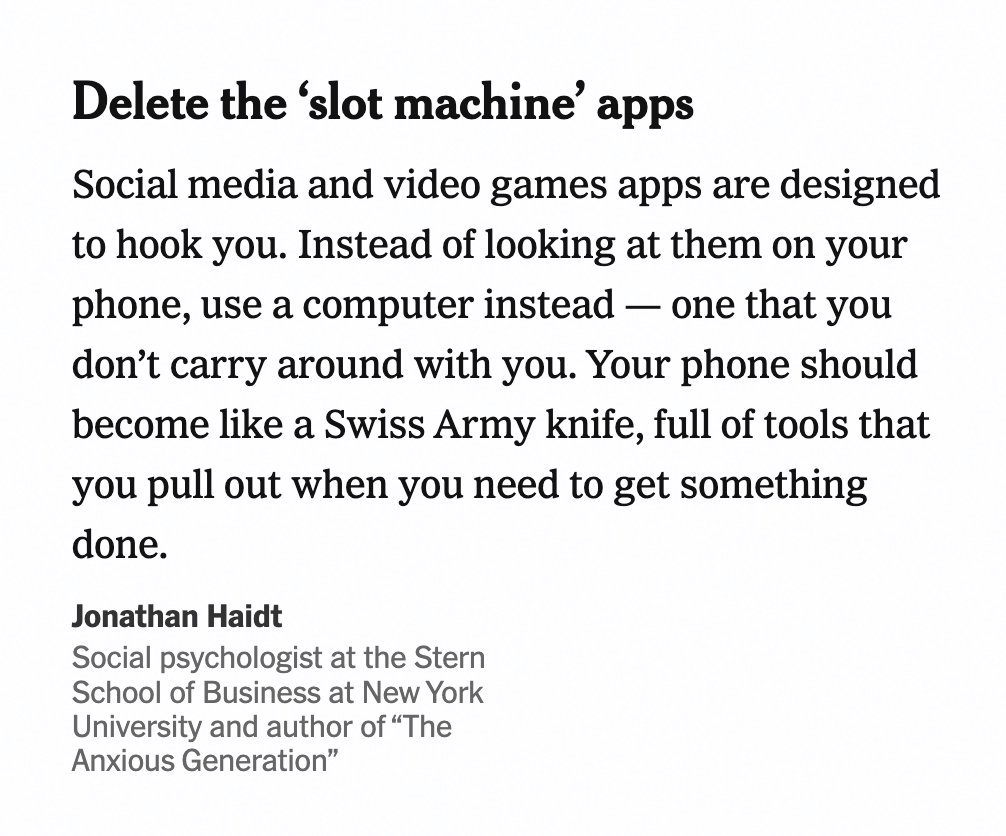
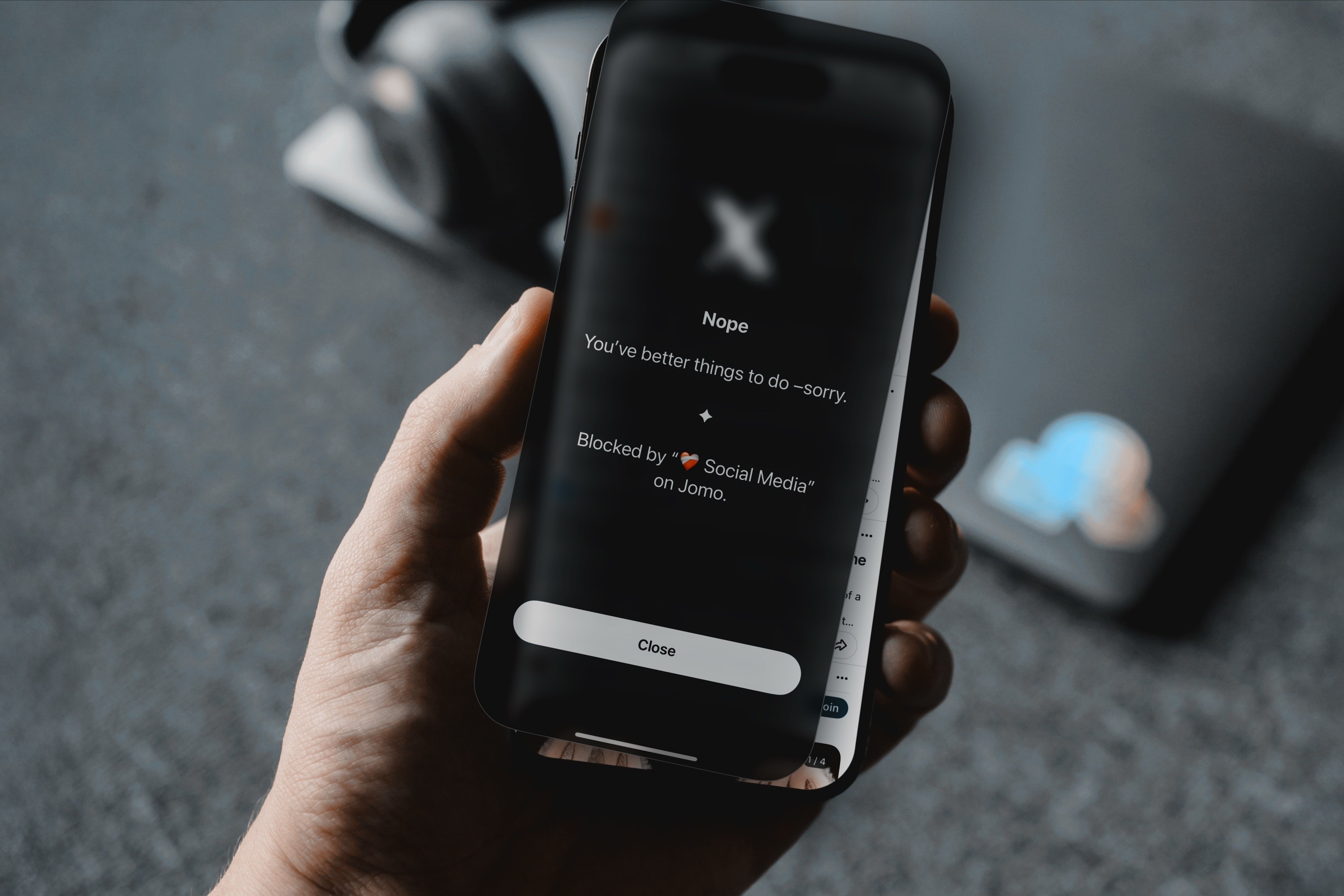
"Slot machine" apps encourage doomscrolling. It's time control them.
Over time, your brain starts linking emotional states to this behavior. Feeling bored? Scroll. Feeling stressed? Scroll. Feeling uneasy with silence? Scroll. The habit becomes automatic, and the phone turns into the fastest way to escape discomfort.
Stopping doomscrolling is not about removing pleasure from your life. It is about retraining the habit loop and adding just enough friction and intention so scrolling stops being the default response to every emotion.
Two hours later, your mug is still empty, your brain feels heavy, and somehow you have watched a complete stranger reorganize their fridge, a 47-part morning routine and a video you do not even remember liking.
What makes doomscrolling particularly frustrating is that it does not even feel good for very long. It promises relief, distraction, or connection, but often delivers mental fatigue, scattered attention, and that feeling of having lost time without choosing to.
If you scroll for just 2 hours a day, which is already below the average for many people, that adds up to more than 730 hours a year. Almost an entire month of your life spent consuming content that was never designed to make you feel calmer, more focused, or more fulfilled.
The good news is: doomscrolling is not a lack of discipline. It is a habit. And like any habit, it can be redesigned.
In this article, we will look at why doomscrolling is so hard to stop, and then share 5 practical hacks that actually help you break the scrolling habit without guilt, shame or unrealistic rules.
By the way, I’m Thomas, co-founder of Jomo. Over the last 4 years, I’ve spent most of my time thinking about screen time habits and building an app used by more than 250,000 people. Everything you’ll read here is directly inspired by what we’ve learned from helping people reduce doomscrolling in real life, not in theory.
Why Doomscrolling Is So Hard to Stop
Doomscrolling is not just “scrolling too much”. It is a very specific habit with a predictable pattern.
It usually appears when you feel bored, tired, anxious or slightly uncomfortable. You do not open your phone because you made a clear decision. You open your phone because your brain wants relief.
Modern apps are extremely good at reinforcing this habit. Endless feeds, autoplay videos and red notification badges are not accidental. They are carefully designed to maximize engagement by constantly offering novelty.
From a neuroscience perspective, this makes a lot of sense. Scrolling triggers dopamine, a neurotransmitter associated with motivation and reward. Importantly, dopamine is released in anticipation of a reward, not when the reward is actually received. Research by Schultz and colleagues showed that dopamine spikes most strongly when a reward is uncertain and potentially upcoming. Every swipe carries that uncertainty. Something new might appear. Something interesting might happen.
"Slot machine" apps encourage doomscrolling. It's time control them.
Over time, your brain starts linking emotional states to this behavior. Feeling bored? Scroll. Feeling stressed? Scroll. Feeling uneasy with silence? Scroll. The habit becomes automatic, and the phone turns into the fastest way to escape discomfort.
Stopping doomscrolling is not about removing pleasure from your life. It is about retraining the habit loop and adding just enough friction and intention so scrolling stops being the default response to every emotion.
Two hours later, your mug is still empty, your brain feels heavy, and somehow you have watched a complete stranger reorganize their fridge, a 47-part morning routine and a video you do not even remember liking.
What makes doomscrolling particularly frustrating is that it does not even feel good for very long. It promises relief, distraction, or connection, but often delivers mental fatigue, scattered attention, and that feeling of having lost time without choosing to.
If you scroll for just 2 hours a day, which is already below the average for many people, that adds up to more than 730 hours a year. Almost an entire month of your life spent consuming content that was never designed to make you feel calmer, more focused, or more fulfilled.
The good news is: doomscrolling is not a lack of discipline. It is a habit. And like any habit, it can be redesigned.
In this article, we will look at why doomscrolling is so hard to stop, and then share 5 practical hacks that actually help you break the scrolling habit without guilt, shame or unrealistic rules.
By the way, I’m Thomas, co-founder of Jomo. Over the last 4 years, I’ve spent most of my time thinking about screen time habits and building an app used by more than 250,000 people. Everything you’ll read here is directly inspired by what we’ve learned from helping people reduce doomscrolling in real life, not in theory.
Why Doomscrolling Is So Hard to Stop
Doomscrolling is not just “scrolling too much”. It is a very specific habit with a predictable pattern.
It usually appears when you feel bored, tired, anxious or slightly uncomfortable. You do not open your phone because you made a clear decision. You open your phone because your brain wants relief.
Modern apps are extremely good at reinforcing this habit. Endless feeds, autoplay videos and red notification badges are not accidental. They are carefully designed to maximize engagement by constantly offering novelty.
From a neuroscience perspective, this makes a lot of sense. Scrolling triggers dopamine, a neurotransmitter associated with motivation and reward. Importantly, dopamine is released in anticipation of a reward, not when the reward is actually received. Research by Schultz and colleagues showed that dopamine spikes most strongly when a reward is uncertain and potentially upcoming. Every swipe carries that uncertainty. Something new might appear. Something interesting might happen.
"Slot machine" apps encourage doomscrolling. It's time control them.
Over time, your brain starts linking emotional states to this behavior. Feeling bored? Scroll. Feeling stressed? Scroll. Feeling uneasy with silence? Scroll. The habit becomes automatic, and the phone turns into the fastest way to escape discomfort.
Stopping doomscrolling is not about removing pleasure from your life. It is about retraining the habit loop and adding just enough friction and intention so scrolling stops being the default response to every emotion.
Your phone, your rules. Block on command and own your time.
For 30min
Everyday
On weekends
During workhours
From 10 pm to 8 am
For 7 days
All the time
Your phone, your rules. Block on command and own your time.
For 30min
Everyday
On weekends
During workhours
From 10 pm to 8 am
For 7 days
All the time
Your phone, your rules. Block on command and own your time.
For 30min
Everyday
On weekends
During workhours
From 10 pm to 8 am
For 7 days
All the time
5 Hacks to Stop Doomscrolling That Actually Work
1. Schedule your scrolling sessions
One of the biggest problems with doomscrolling is that it has no boundaries. You do not decide when it starts, and you do not decide when it ends.
A powerful way to change this habit is to schedule your scrolling sessions on purpose. Instead of trying to eliminate scrolling entirely, you give it a specific place in your day. For example, 15 minutes after lunch and 15 minutes in the early evening.
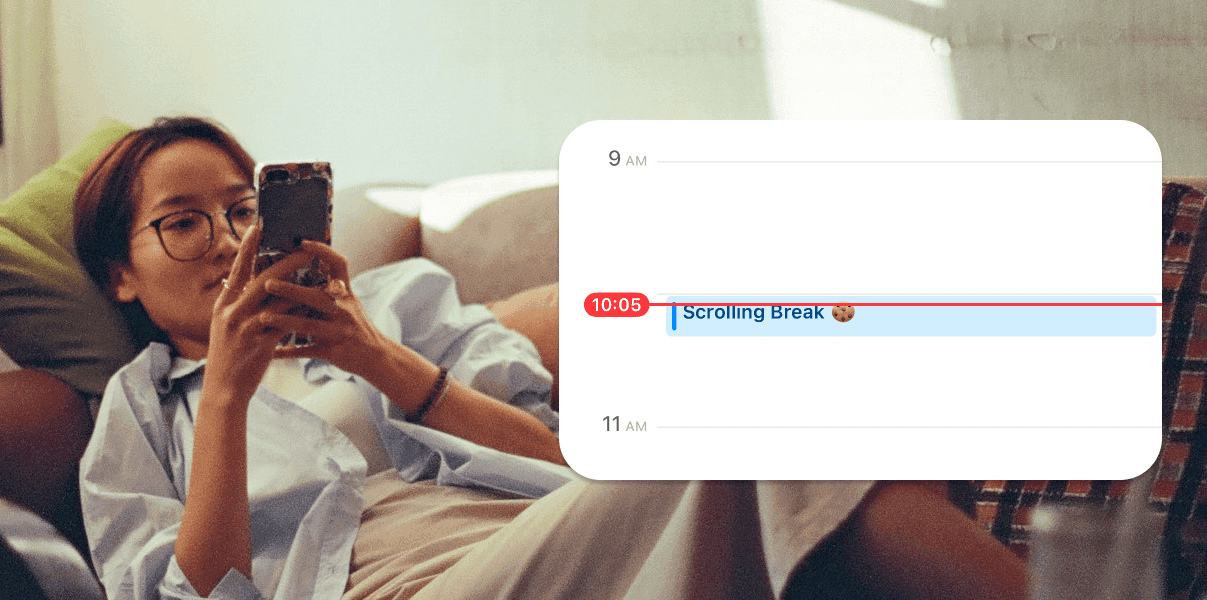
Timebox your scroll and enjoy it… without guilt!
This changes the habit in two important ways. First, it increases awareness. You stop scrolling “by accident”. Second, it reduces compulsive use. When you know you have a dedicated time to scroll later, the urge to check your phone every few minutes becomes weaker.
In practice, this works best when you add a bit of structure. With an app blocker like Jomo, you can limit the number of times you open a specific app, such as Instagram. For example, you might allow two opens per day. Before each open, you choose how long you want to stay, like 15 minutes, and optionally complete a small exercise such as waiting a few seconds or writing why you want to use the app.
That tiny friction makes a big difference. It turns scrolling into a choice instead of a reflex. You can even put these scrolling sessions directly into your calendar so they become part of your routine rather than something that invades it.
Also, your scrolling sessions are timed, and an app blocker can automatically lock Instagram (for example) again once your 15-minute session has ended. This can stop doomscrolling entirely.
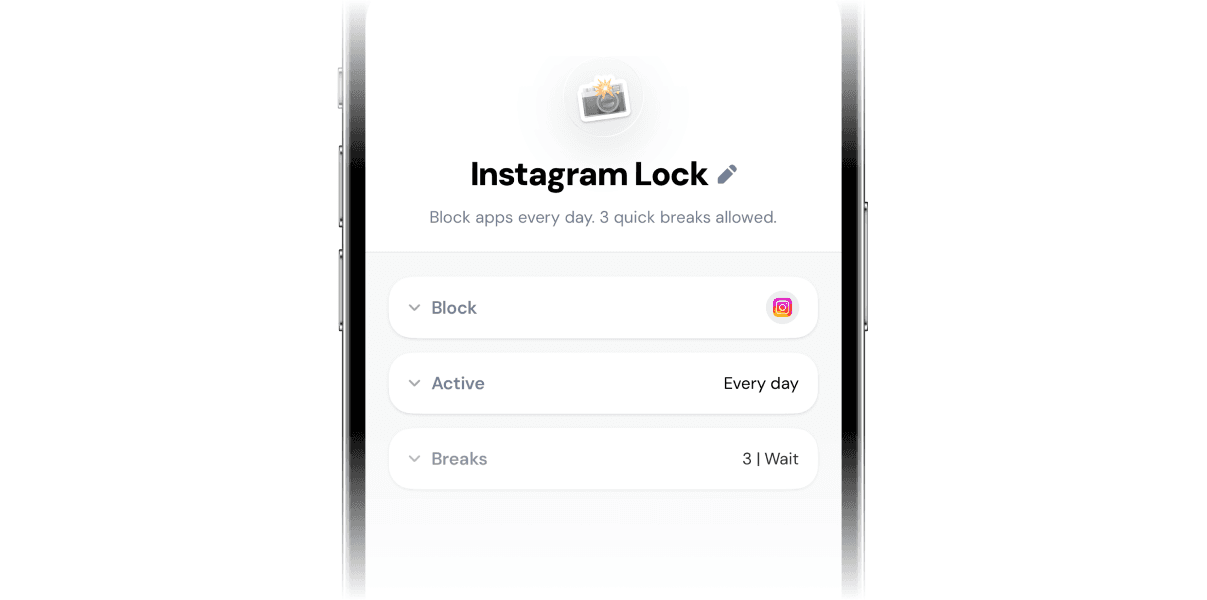
3 opens of Instagram per day. Each scrolling session is timed. Bye bye doomscrolling!
You can set an opens limit like this in the next 2 minutes and start making doomscrolling harder right away:
Once in the app, go to Rules > + > Recurring Session.
Choose the distracting apps you want to add friction to.
The interesting part happens in the “Breaks” section.
Choose how many breaks (or opens) you want per day. A good rule of thumb is to split your opens into sessions of 5 or 10 minutes max. For example, if you want to spend no more than 30 minutes on Instagram per day, you can set 3 opens of 10 minutes or 6 opens of 5 minutes.
Choose a quick exercise to complete before each open (the friction): waiting, breathing, writing your reason for using the app, etc. This is where Jomo shines. Use friction that is gentle but consistent.
If you don’t know where to start, do this. Many people notice that once scrolling becomes intentional, they actually enjoy it more and do it less.
2. Go Grayscale (But Do It Strategically)
Another "surprisingly" effective hack is reducing color.
Social media apps rely heavily on bright colors to capture attention and amplify emotional reactions. Turning your phone to black and white makes content feel flatter, calmer, and less stimulating. This works because reducing sensory stimulation weakens the reward side of the habit loop, making it easier to disengage.
Some people recommend switching your entire phone to grayscale. This can work, but it is often too extreme. Many people remove it after a few days because it feels frustrating to use a 1000$ phone with no color at all (been there, done that).
I’ve learned that a better approach is to apply grayscale only to specific distracting apps. On iPhone, this can be done easily using the Apple’s Shortcut app so that apps like Instagram automatically appear in black and white.
This way, you keep your phone pleasant for useful tasks, while making doomscrolling noticeably less appealing. The habit loses some of its pull without requiring willpower.
3. Remove Tempting Apps From Your Home Screen
Many doomscrolling sessions start with muscle memory.
You unlock your phone, and your thumb already knows where to go.
Removing distracting apps from your home screen is one of the easiest ways to interrupt this automatic loop. Hide Instagram, TikTok, X, or YouTube in folders (and named them something like "Do I Really Need This? 🤔" or "Brain Poison ☠️") or remove them entirely and use the browser version when necessary.
This adds a small but meaningful amount of friction. You can still access the app, but you have to go looking for it. That extra step is often enough to bring awareness back into the habit.
In general, I recommend keeping your home screen minimal and functional. You can follow the guide we wrote here to make your iPhone less distracting. The core idea is to keep only the essentials tools or apps that are net positive on your home screen (aim for no more than 6 apps). You can also add a few apps in the dock if needed like Messages and Phone.
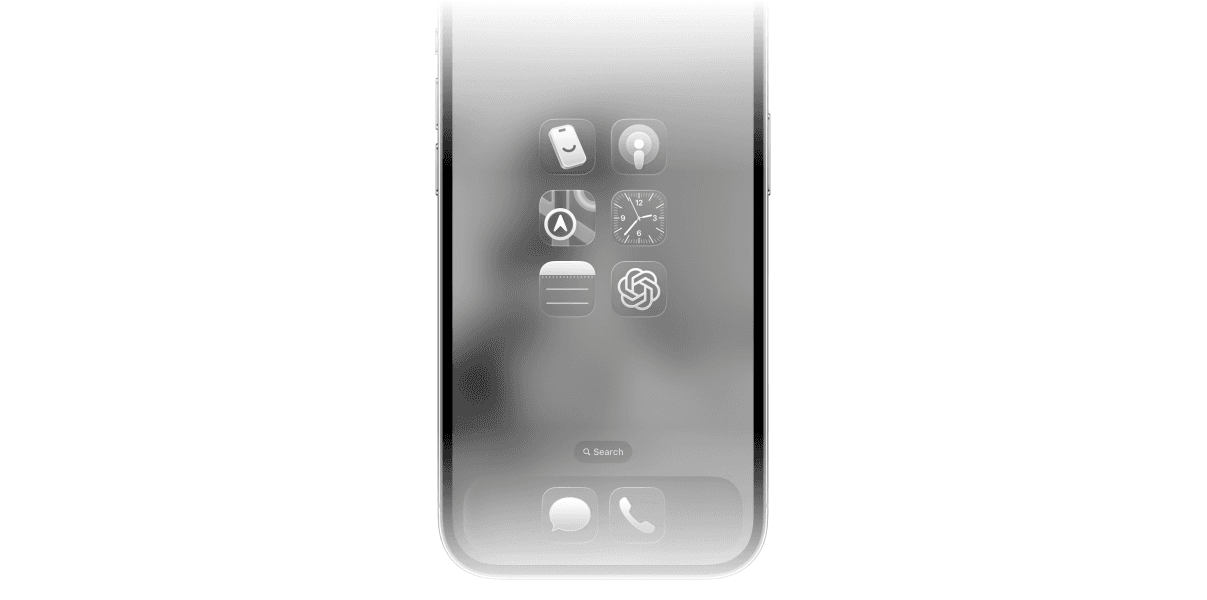
Leave only a few essential tools on your home screen. Tone down the colors, like I did, to make your phone less appealing.
Everything else stays out of sight. You do not need to delete apps forever. You just need to stop making them the first thing you see.
4. Give Your Phone A Home
Doomscrolling thrives on proximity.
If your phone is always in your pocket, on your desk, on the couch, or in your bed, the habit is constantly triggered by sight and touch.
A simple but powerful environmental change is to give your phone a “home”. A specific place where it lives when you are not using it intentionally. A drawer, a shelf, a charging station near the door. Somewhere that is not within arm’s reach all the time. Then, you leave it there until you next leave the house. If you need to look something up, you go to your "phone home" and look it up there.
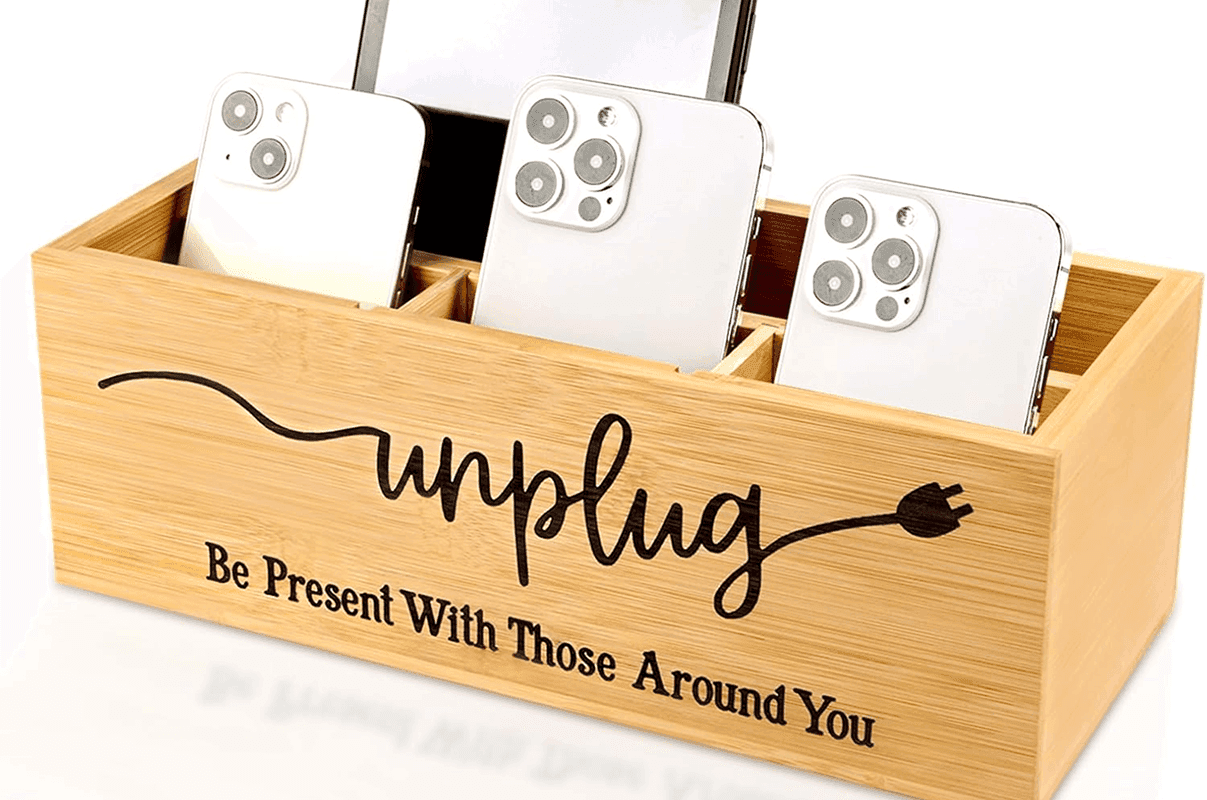
Put a phone box near the door. It helps the whole family be more intentional.
When your phone is out of sight, the scrolling habit loses one of its strongest cues. Research in habit formation consistently shows that removing cues is often more effective than trying to suppress behavior directly.
To reinforce this habit, keep your phone on silent and combine it with simple rules like no phones at the table or during conversations. Over time, you will notice that reaching for your phone becomes less automatic.
5. Start Your Day Without Your Phone
For many people, doomscrolling habits are set in motion first thing in the morning.
Your brain is especially sensitive right after waking up. If the first thing you do is reach for your phone, you flood your mind with information, dopamine, and emotional noise before the day has even started.
Studies suggest that early digital exposure can increase stress and reduce perceived control over the day. Starting the day phone-free helps your brain ease into wakefulness more naturally.
A powerful habit is to keep the first hour of your morning phone-free. Replace scrolling with something simple: coffee, stretching, journaling, a shower, or just sitting quietly.
To make this habit easier, change the environment:
Do not use your phone as an alarm clock. Use a dedicated alarm and keep your phone in another room. In general, try to introduce more single-purpose objects in your environment. The more that you split functions off into other items, the less that the phone becomes the center of your universe.
You can also use Jomo to schedule a morning block, for example from 6am to 9am, that blocks distracting apps while keeping essentials available.
This one habit often reduces doomscrolling for the entire day because it changes how your brain seeks stimulation.
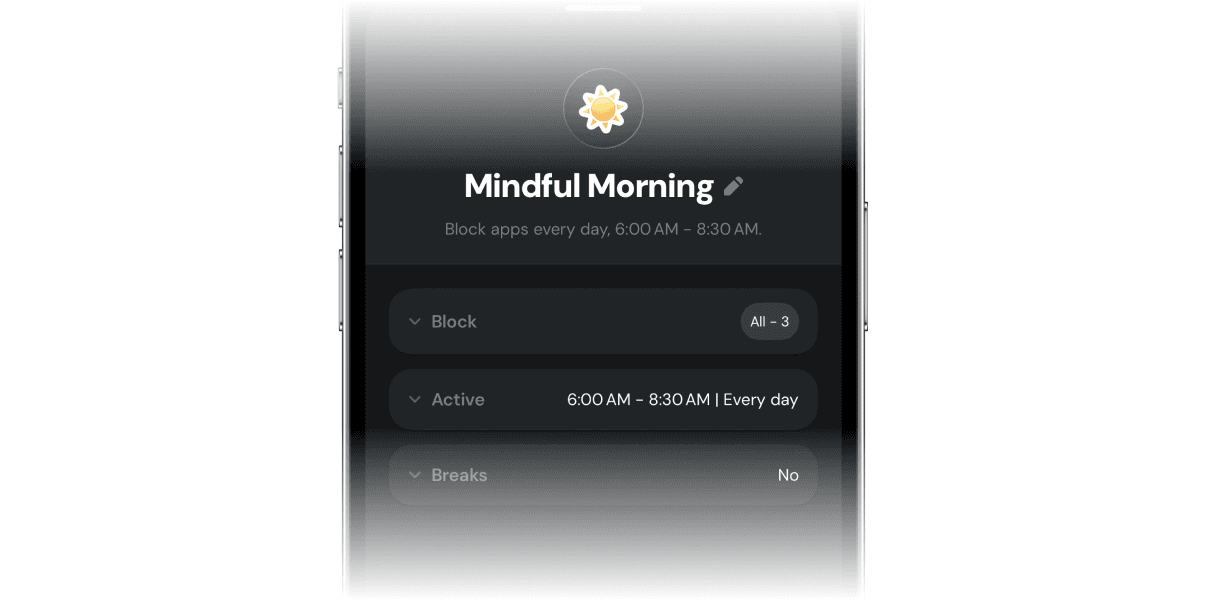
I block all but essentials apps on my phone from 6AM to 8:30AM.
Stopping doomscrolling is not about discipline or moral strength. It is about designing better habits.
The goal is not to never scroll again. The goal is to stop scrolling by default. To stop using your phone as an automatic response to boredom, stress, or discomfort.
Each hack in this article works in the same way. It adds friction, increases awareness, and turns unconscious scrolling into a choice.
You do not need to apply all of them at once. Pick one. Try it for a week. Then add another.
Over time, the scrolling habit loosens its grip. Not because you forced it to, but because it no longer fits the life you are building.
That is how doomscrolling ends. Not with guilt, but with better habits.
Thanks for reading so far! If you want to give our app Jomo a try, you can download it from the App Store and use my code JZ5RP5 to get the Plus plan free for 14 days.
5 Hacks to Stop Doomscrolling That Actually Work
1. Schedule your scrolling sessions
One of the biggest problems with doomscrolling is that it has no boundaries. You do not decide when it starts, and you do not decide when it ends.
A powerful way to change this habit is to schedule your scrolling sessions on purpose. Instead of trying to eliminate scrolling entirely, you give it a specific place in your day. For example, 15 minutes after lunch and 15 minutes in the early evening.
Timebox your scroll and enjoy it… without guilt!
This changes the habit in two important ways. First, it increases awareness. You stop scrolling “by accident”. Second, it reduces compulsive use. When you know you have a dedicated time to scroll later, the urge to check your phone every few minutes becomes weaker.
In practice, this works best when you add a bit of structure. With an app blocker like Jomo, you can limit the number of times you open a specific app, such as Instagram. For example, you might allow two opens per day. Before each open, you choose how long you want to stay, like 15 minutes, and optionally complete a small exercise such as waiting a few seconds or writing why you want to use the app.
That tiny friction makes a big difference. It turns scrolling into a choice instead of a reflex. You can even put these scrolling sessions directly into your calendar so they become part of your routine rather than something that invades it.
Also, your scrolling sessions are timed, and an app blocker can automatically lock Instagram (for example) again once your 15-minute session has ended. This can stop doomscrolling entirely.
3 opens of Instagram per day. Each scrolling session is timed. Bye bye doomscrolling!
You can set an opens limit like this in the next 2 minutes and start making doomscrolling harder right away:
Once in the app, go to Rules > + > Recurring Session.
Choose the distracting apps you want to add friction to.
The interesting part happens in the “Breaks” section.
Choose how many breaks (or opens) you want per day. A good rule of thumb is to split your opens into sessions of 5 or 10 minutes max. For example, if you want to spend no more than 30 minutes on Instagram per day, you can set 3 opens of 10 minutes or 6 opens of 5 minutes.
Choose a quick exercise to complete before each open (the friction): waiting, breathing, writing your reason for using the app, etc. This is where Jomo shines. Use friction that is gentle but consistent.
If you don’t know where to start, do this. Many people notice that once scrolling becomes intentional, they actually enjoy it more and do it less.
2. Go Grayscale (But Do It Strategically)
Another "surprisingly" effective hack is reducing color.
Social media apps rely heavily on bright colors to capture attention and amplify emotional reactions. Turning your phone to black and white makes content feel flatter, calmer, and less stimulating. This works because reducing sensory stimulation weakens the reward side of the habit loop, making it easier to disengage.
Some people recommend switching your entire phone to grayscale. This can work, but it is often too extreme. Many people remove it after a few days because it feels frustrating to use a 1000$ phone with no color at all (been there, done that).
I’ve learned that a better approach is to apply grayscale only to specific distracting apps. On iPhone, this can be done easily using the Apple’s Shortcut app so that apps like Instagram automatically appear in black and white.
This way, you keep your phone pleasant for useful tasks, while making doomscrolling noticeably less appealing. The habit loses some of its pull without requiring willpower.
3. Remove Tempting Apps From Your Home Screen
Many doomscrolling sessions start with muscle memory.
You unlock your phone, and your thumb already knows where to go.
Removing distracting apps from your home screen is one of the easiest ways to interrupt this automatic loop. Hide Instagram, TikTok, X, or YouTube in folders (and named them something like "Do I Really Need This? 🤔" or "Brain Poison ☠️") or remove them entirely and use the browser version when necessary.
This adds a small but meaningful amount of friction. You can still access the app, but you have to go looking for it. That extra step is often enough to bring awareness back into the habit.
In general, I recommend keeping your home screen minimal and functional. You can follow the guide we wrote here to make your iPhone less distracting. The core idea is to keep only the essentials tools or apps that are net positive on your home screen (aim for no more than 6 apps). You can also add a few apps in the dock if needed like Messages and Phone.
Leave only a few essential tools on your home screen. Tone down the colors, like I did, to make your phone less appealing.
Everything else stays out of sight. You do not need to delete apps forever. You just need to stop making them the first thing you see.
4. Give Your Phone A Home
Doomscrolling thrives on proximity.
If your phone is always in your pocket, on your desk, on the couch, or in your bed, the habit is constantly triggered by sight and touch.
A simple but powerful environmental change is to give your phone a “home”. A specific place where it lives when you are not using it intentionally. A drawer, a shelf, a charging station near the door. Somewhere that is not within arm’s reach all the time. Then, you leave it there until you next leave the house. If you need to look something up, you go to your "phone home" and look it up there.
Put a phone box near the door. It helps the whole family be more intentional.
When your phone is out of sight, the scrolling habit loses one of its strongest cues. Research in habit formation consistently shows that removing cues is often more effective than trying to suppress behavior directly.
To reinforce this habit, keep your phone on silent and combine it with simple rules like no phones at the table or during conversations. Over time, you will notice that reaching for your phone becomes less automatic.
5. Start Your Day Without Your Phone
For many people, doomscrolling habits are set in motion first thing in the morning.
Your brain is especially sensitive right after waking up. If the first thing you do is reach for your phone, you flood your mind with information, dopamine, and emotional noise before the day has even started.
Studies suggest that early digital exposure can increase stress and reduce perceived control over the day. Starting the day phone-free helps your brain ease into wakefulness more naturally.
A powerful habit is to keep the first hour of your morning phone-free. Replace scrolling with something simple: coffee, stretching, journaling, a shower, or just sitting quietly.
To make this habit easier, change the environment:
Do not use your phone as an alarm clock. Use a dedicated alarm and keep your phone in another room. In general, try to introduce more single-purpose objects in your environment. The more that you split functions off into other items, the less that the phone becomes the center of your universe.
You can also use Jomo to schedule a morning block, for example from 6am to 9am, that blocks distracting apps while keeping essentials available.
This one habit often reduces doomscrolling for the entire day because it changes how your brain seeks stimulation.
I block all but essentials apps on my phone from 6AM to 8:30AM.
Stopping doomscrolling is not about discipline or moral strength. It is about designing better habits.
The goal is not to never scroll again. The goal is to stop scrolling by default. To stop using your phone as an automatic response to boredom, stress, or discomfort.
Each hack in this article works in the same way. It adds friction, increases awareness, and turns unconscious scrolling into a choice.
You do not need to apply all of them at once. Pick one. Try it for a week. Then add another.
Over time, the scrolling habit loosens its grip. Not because you forced it to, but because it no longer fits the life you are building.
That is how doomscrolling ends. Not with guilt, but with better habits.
Thanks for reading so far! If you want to give our app Jomo a try, you can download it from the App Store and use my code JZ5RP5 to get the Plus plan free for 14 days.
5 Hacks to Stop Doomscrolling That Actually Work
1. Schedule your scrolling sessions
One of the biggest problems with doomscrolling is that it has no boundaries. You do not decide when it starts, and you do not decide when it ends.
A powerful way to change this habit is to schedule your scrolling sessions on purpose. Instead of trying to eliminate scrolling entirely, you give it a specific place in your day. For example, 15 minutes after lunch and 15 minutes in the early evening.
Timebox your scroll and enjoy it… without guilt!
This changes the habit in two important ways. First, it increases awareness. You stop scrolling “by accident”. Second, it reduces compulsive use. When you know you have a dedicated time to scroll later, the urge to check your phone every few minutes becomes weaker.
In practice, this works best when you add a bit of structure. With an app blocker like Jomo, you can limit the number of times you open a specific app, such as Instagram. For example, you might allow two opens per day. Before each open, you choose how long you want to stay, like 15 minutes, and optionally complete a small exercise such as waiting a few seconds or writing why you want to use the app.
That tiny friction makes a big difference. It turns scrolling into a choice instead of a reflex. You can even put these scrolling sessions directly into your calendar so they become part of your routine rather than something that invades it.
Also, your scrolling sessions are timed, and an app blocker can automatically lock Instagram (for example) again once your 15-minute session has ended. This can stop doomscrolling entirely.
3 opens of Instagram per day. Each scrolling session is timed. Bye bye doomscrolling!
You can set an opens limit like this in the next 2 minutes and start making doomscrolling harder right away:
Once in the app, go to Rules > + > Recurring Session.
Choose the distracting apps you want to add friction to.
The interesting part happens in the “Breaks” section.
Choose how many breaks (or opens) you want per day. A good rule of thumb is to split your opens into sessions of 5 or 10 minutes max. For example, if you want to spend no more than 30 minutes on Instagram per day, you can set 3 opens of 10 minutes or 6 opens of 5 minutes.
Choose a quick exercise to complete before each open (the friction): waiting, breathing, writing your reason for using the app, etc. This is where Jomo shines. Use friction that is gentle but consistent.
If you don’t know where to start, do this. Many people notice that once scrolling becomes intentional, they actually enjoy it more and do it less.
2. Go Grayscale (But Do It Strategically)
Another "surprisingly" effective hack is reducing color.
Social media apps rely heavily on bright colors to capture attention and amplify emotional reactions. Turning your phone to black and white makes content feel flatter, calmer, and less stimulating. This works because reducing sensory stimulation weakens the reward side of the habit loop, making it easier to disengage.
Some people recommend switching your entire phone to grayscale. This can work, but it is often too extreme. Many people remove it after a few days because it feels frustrating to use a 1000$ phone with no color at all (been there, done that).
I’ve learned that a better approach is to apply grayscale only to specific distracting apps. On iPhone, this can be done easily using the Apple’s Shortcut app so that apps like Instagram automatically appear in black and white.
This way, you keep your phone pleasant for useful tasks, while making doomscrolling noticeably less appealing. The habit loses some of its pull without requiring willpower.
3. Remove Tempting Apps From Your Home Screen
Many doomscrolling sessions start with muscle memory.
You unlock your phone, and your thumb already knows where to go.
Removing distracting apps from your home screen is one of the easiest ways to interrupt this automatic loop. Hide Instagram, TikTok, X, or YouTube in folders (and named them something like "Do I Really Need This? 🤔" or "Brain Poison ☠️") or remove them entirely and use the browser version when necessary.
This adds a small but meaningful amount of friction. You can still access the app, but you have to go looking for it. That extra step is often enough to bring awareness back into the habit.
In general, I recommend keeping your home screen minimal and functional. You can follow the guide we wrote here to make your iPhone less distracting. The core idea is to keep only the essentials tools or apps that are net positive on your home screen (aim for no more than 6 apps). You can also add a few apps in the dock if needed like Messages and Phone.
Leave only a few essential tools on your home screen. Tone down the colors, like I did, to make your phone less appealing.
Everything else stays out of sight. You do not need to delete apps forever. You just need to stop making them the first thing you see.
4. Give Your Phone A Home
Doomscrolling thrives on proximity.
If your phone is always in your pocket, on your desk, on the couch, or in your bed, the habit is constantly triggered by sight and touch.
A simple but powerful environmental change is to give your phone a “home”. A specific place where it lives when you are not using it intentionally. A drawer, a shelf, a charging station near the door. Somewhere that is not within arm’s reach all the time. Then, you leave it there until you next leave the house. If you need to look something up, you go to your "phone home" and look it up there.
Put a phone box near the door. It helps the whole family be more intentional.
When your phone is out of sight, the scrolling habit loses one of its strongest cues. Research in habit formation consistently shows that removing cues is often more effective than trying to suppress behavior directly.
To reinforce this habit, keep your phone on silent and combine it with simple rules like no phones at the table or during conversations. Over time, you will notice that reaching for your phone becomes less automatic.
5. Start Your Day Without Your Phone
For many people, doomscrolling habits are set in motion first thing in the morning.
Your brain is especially sensitive right after waking up. If the first thing you do is reach for your phone, you flood your mind with information, dopamine, and emotional noise before the day has even started.
Studies suggest that early digital exposure can increase stress and reduce perceived control over the day. Starting the day phone-free helps your brain ease into wakefulness more naturally.
A powerful habit is to keep the first hour of your morning phone-free. Replace scrolling with something simple: coffee, stretching, journaling, a shower, or just sitting quietly.
To make this habit easier, change the environment:
Do not use your phone as an alarm clock. Use a dedicated alarm and keep your phone in another room. In general, try to introduce more single-purpose objects in your environment. The more that you split functions off into other items, the less that the phone becomes the center of your universe.
You can also use Jomo to schedule a morning block, for example from 6am to 9am, that blocks distracting apps while keeping essentials available.
This one habit often reduces doomscrolling for the entire day because it changes how your brain seeks stimulation.
I block all but essentials apps on my phone from 6AM to 8:30AM.
Stopping doomscrolling is not about discipline or moral strength. It is about designing better habits.
The goal is not to never scroll again. The goal is to stop scrolling by default. To stop using your phone as an automatic response to boredom, stress, or discomfort.
Each hack in this article works in the same way. It adds friction, increases awareness, and turns unconscious scrolling into a choice.
You do not need to apply all of them at once. Pick one. Try it for a week. Then add another.
Over time, the scrolling habit loosens its grip. Not because you forced it to, but because it no longer fits the life you are building.
That is how doomscrolling ends. Not with guilt, but with better habits.
Thanks for reading so far! If you want to give our app Jomo a try, you can download it from the App Store and use my code JZ5RP5 to get the Plus plan free for 14 days.
Credits
Photographies and illustrations by Unsplash. Screenshots by Jomo.
[1] Schultz, W., Dayan, P., & Montague, P. R. (1997). A neural substrate of prediction and reward. Science.
[2] Wood, W., Tam, L., & Witt, M. G. (2005). Changing circumstances, disrupting habits. Journal of Personality and Social Psychology, 88(6).
Continue reading
Continue reading

The Joy Of Missing Out

Crafted in Europe
All rights reserved to Jomo SAS, 2025
The Joy Of Missing Out
Crafted in Europe
All rights reserved to Jomo SAS, 2025
The Joy Of Missing Out
Crafted in Europe
All rights reserved to Jomo SAS, 2025